A private page for every parent
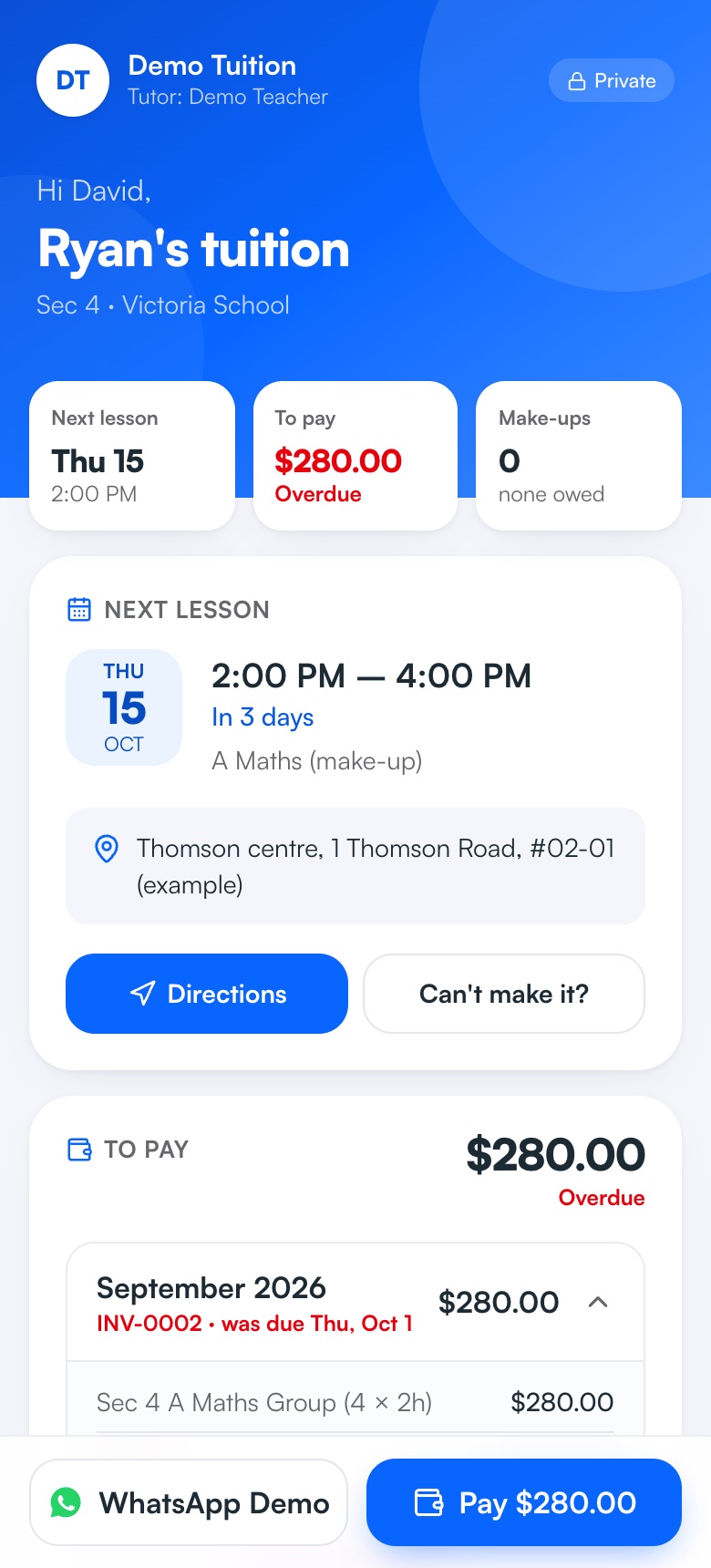
Send each parent one private link with everything they usually WhatsApp you about: the next lesson with directions or the Zoom link, invoices with your PayNow QR, make-up lessons and exam countdowns. No app to install, no password — and it's always up to date.
Free on every plan.
How it works
- 1
Create the link
On a student's page, click Create parent page link. Brothers and sisters share one page.
- 2
Send it
WhatsApp or email it in one tap — or have it emailed automatically when you add a student.
- 3
Parents save it
They add it to their home screen, and it opens like an app.
- 4
You hear less “what time is the lesson?”
Parents see the next lesson, what's owed and what's coming up, any time.
What you get
- Next lesson and directionsTime, place with a Directions button, or the Zoom link — and the lessons sync to their phone's calendar.
- Invoices with PayNowUnpaid invoices with your QR. Parents tap “I've paid” and you see it on your Overview.
- “Can't make it?”One tap opens a WhatsApp message to you about that lesson.
- Make-ups and examsMake-up lessons owed, plus countdowns to their child's school and national exams.
- Private by designAn unguessable link, never in search engines. Reset or turn it off any time.
- Reviews, gentlyParents whose children have had lessons can leave a Google review or record a short video for you.
- A page for the student tooEach student can have their own private link — their lessons, Zoom link or directions, make-ups and exam countdowns, with fees kept on the parent's page. Emailed to them when you add their email.
Instead of…
Answering “what time is the lesson?” on WhatsApp
The next lesson always on their page
Re-sending invoices parents can't find
Every invoice and its QR in one place
Asking parents to download yet another app
One link — no app, no password
Common questions
Do parents need to download an app or create an account?
No. Each parent gets one private link that opens in any browser. They can save it to their home screen so it opens like an app.
What do parents see on their page?
Upcoming lessons with the place or Zoom link, invoices with your PayNow QR, make-up lessons owed, exam countdowns and the lesson history. You choose whether they see your lesson plans.
Is it private?
Yes. The link is long and unguessable, never shown in search engines, and you can reset or turn it off at any time if it's sent to the wrong person.
Is the parent page free?
Yes, on every plan, including Free.
Can students have their own page?
Yes. Each student can get their own private link with just their lessons, Zoom link or directions, make-ups and exam countdowns — no fees (unless they pay for their own lessons, like JC or adult students). Add the student's email and it's sent to them automatically. Free on every plan.
Step-by-step help
Guides for tutors
Free for your first 5 students · No card needed
Try parent page with your own students today.