Testimonials and Google reviews from happy parents — on your own Wall of love
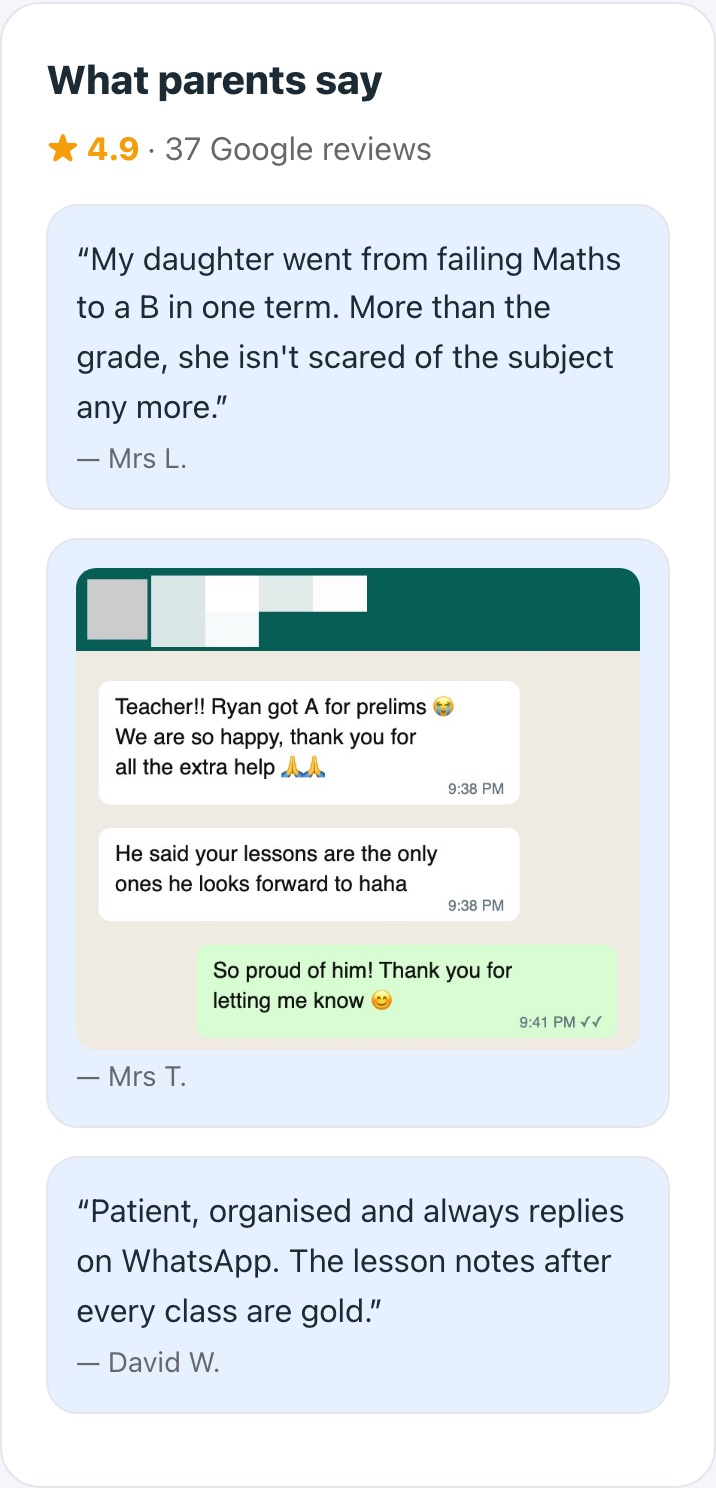
Send a parent a link on WhatsApp. They write a few lines or record a short video with your questions to help, and it arrives in TuitionCRM. Already have kind WhatsApp messages? Add the screenshot and blur their name and number. Turn on Show on my website and it appears on your Wall of love — or share it as a picture. Ask for Google reviews the same way.
Written testimonials and WhatsApp screenshots are unlimited on every plan. Video testimonials: Free includes 1; Pro 20 a year; Pro Plus 50 a year; Centre 150 a year. Asking for Google reviews is free on every plan.
How it works
- 1
Ask
Pick the parent and send the link by WhatsApp or email — or ask several parents at once.
- 2
They reply
Parents write a few lines, or record a short video with your questions on screen one at a time.
- 3
It arrives
You're emailed when it's in. Add WhatsApp screenshots and pasted messages to the same list.
- 4
Show and share it
One tap puts it on your website's Wall of love; another makes a picture for WhatsApp status or Instagram.
What you get
- Write or recordMost parents would rather write two lines than film themselves — so they can. Written ones are unlimited.
- WhatsApp screenshots, names blurredDrag over the parent's name, number and photo; only the blurred picture is saved.
- A Wall of love on your websiteMix videos, written words and screenshots, with your Google rating on top.
- Every video written outA transcript of what they said, ready to quote in posts and profiles.
- Google reviews in two tapsSave your Google review link once, then send it to any parent.
- Asks at the right momentYour Overview suggests parents at 3, 6 or 12 months with you; parent pages ask gently too.
- A reminder if they forgetOne polite email after 3 days, or a one-tap WhatsApp nudge from you.
- Consent built inParents agree you can share it before they send it; for screenshots you confirm they said yes.
Instead of…
Asking parents to film themselves and send a video file
One link — questions on screen, upload handled
Forgetting to ask until the student leaves
Suggestions when parents reach a milestone
Typing out testimonials from voice notes
Every video written out automatically
Common questions
How do parents record a video testimonial?
They open your link on their phone or computer, allow the camera and microphone, and answer your questions as they appear on screen. They can watch it back and re-record before sending — or upload a video they already have.
Can I download the videos?
Yes. Every video can be watched in TuitionCRM and downloaded to post on Instagram, Facebook or your website. The transcript can be copied too.
How many testimonials can I collect?
Written testimonials and WhatsApp screenshots are unlimited on every plan. Video testimonials: Free includes 1, Pro 20 a year and Centre 150 a year. Asking for Google reviews is included in every plan.
How do I show a WhatsApp message without showing who sent it?
Add the screenshot in Get students → Testimonials, then drag over the parent's name, number and photo. Those parts are blurred on your phone before the picture is saved, and your website only shows a short name like Mrs T.
How do I get my Google review link?
In your Google Business Profile, click Ask for reviews and copy the link (it looks like g.page/r/…/review). Paste it into TuitionCRM once and send it to any parent.
Step-by-step help
- How do I ask a parent for a testimonial?
- How do I show testimonials on my website (Wall of love)?
- How do I add a WhatsApp screenshot of a kind message?
- How do I post a testimonial on WhatsApp status or Instagram?
- How do I ask a parent for a Google review?
- How do I find my Google review link?
- Can I get what the parent said as text?
- Can I ask several parents at once?
Guides for tutors
Free for your first 5 students · No card needed
Try testimonials & reviews with your own students today.