How to Track Make-Up Lessons Without a Notebook
· 8 min read · By Gregory Tan
To track make-up lessons, write down every missed lesson the day it happens: the date, who cancelled, how much notice was given, whether it was charged, and whether a make-up is owed. Keep one running list of make-ups owed for each student, cross each one off when it's booked, and check the list against your invoices once a month. Here's how to set that up so nothing slips, whether you use a notebook, a spreadsheet or an app.
Why make-up lessons get lost
Most tutors don't lose track because they're careless. They lose track because cancellations arrive in five different places, and the make-up happens weeks later.
- Cancellations come in on WhatsApp, calls and texts. A message saying “Jayden has a fever, can we skip today?” gets buried under 40 other chats by Friday.
- The make-up is weeks away. By the time there's a free slot, nobody remembers which lesson it was for.
- Charged or not charged? A short-notice cancel may be charged, so its make-up should be free. A cancel with notice may not be charged, so its make-up should be. Mix these up and you either lose money or bill a parent twice.
- Group classes multiply the problem. One cancelled group lesson can mean six make-ups owed to six families.
- Exam season. In the weeks before prelims and national exams, students cancel more and you have fewer free slots, so the list grows fastest when you have the least time.
What to record for every missed lesson
Whatever tool you use, record the same six things. If any one is missing, you'll end up guessing later.
| Record | Example | Why it matters |
|---|---|---|
| Missed lesson date and time | Wed 21 Oct, 3:30pm, H2 Maths | So the make-up is tied to one real lesson |
| Who cancelled | Student (school camp) | Tutor cancellations almost always get a make-up |
| Notice given | A week before | Decides whether it's charged under your policy |
| Charged? | No | If it was charged, the make-up is free |
| Make-up owed? | Yes | The list you actually work from |
| Make-up booked for | Sat 7 Nov, 10am | Cross it off only when there's a date |
Decide your make-up rules before you track anything
Tracking only works if you know which missed lessons earn a make-up. Write the rules down once, send them to parents, and apply them the same way to every family. If you don't have a policy yet, start with our cancellation and make-up policy template.
- You cancel: a make-up, or the lesson isn't charged.
- Student cancels with notice (often 24 hours): a make-up, and the lesson isn't charged until it happens.
- Student cancels at short notice: charged in full. Some tutors still offer a make-up if they have a slot.
- No-show: charged, no make-up.
Should make-up lessons expire?
An expiry date (for example, “make-ups must be used within the term”) stops a list of old make-ups from piling up. Be careful, though. If the lesson was paid for and the make-up expires, the parent has paid for nothing, and that feels unfair. A fairer rule is: make-ups don't expire, but they must be used before the student stops lessons. Otherwise the missed lesson is refunded.
Group classes
For groups, decide whether a make-up means a 1-to-1 slot, a seat in another group at the same level, or a recording or worksheet. Seats in another group are the easiest to give, and they cost you nothing extra.
Three ways to track make-ups
1. A notebook or your phone's notes
Fine for three or four students. Keep a single page titled “Make-ups owed”, one line per missed lesson, and strike through each line when it's booked. The weak spot is the link to your invoices: nothing reminds you that a make-up should be free or charged when you bill at the end of the month.
2. A spreadsheet
Better once you have more than a handful of students. Use one row per missed lesson with the six columns from the table above, and filter on “Make-up owed = Yes” and “Booked for = blank” to see what's outstanding. Our free tuition tracker template for Excel and Google Sheets already has attendance and payment tabs you can build on. The weak spot: you still have to copy every WhatsApp cancellation into it by hand.
If you share the sheet with an assistant or another teacher, remember it holds children's names and parents' phone numbers. Limit who can open it and don't leave copies on shared computers. The PDPC's Data Protection Essentials lists the basic practices expected of small businesses.
3. Tuition software that counts them for you
In a tuition app, marking the attendance is the only step. The app works out whether a make-up is owed, keeps the list, and changes the invoice when the make-up happens. Here's how the three options compare:
| Notebook | Spreadsheet | Tuition app | |
|---|---|---|---|
| Setup time | None | 30–60 minutes | 10 minutes |
| Make-ups owed, at a glance | Flip through pages | With a filter | Listed for you |
| Linked to invoices | No | Only by hand | Yes |
| Parents can see it | No | No | Yes, on their parent page |
| Works for group classes | Hard | Possible | Yes |
How to track make-ups in TuitionCRM, step by step
TuitionCRM is free for up to 5 students, and make-up tracking is included on every plan. Set it up once:
- Go to Invoices and click Settings. Under Make-up lessons, tick when a make-up is owed: when you cancel, when a student cancels in advance, at short notice, or for a no-show. Click Save.
- If you're moving from a notebook, set Count missed lessons from to the date you start, so older cancellations aren't counted.
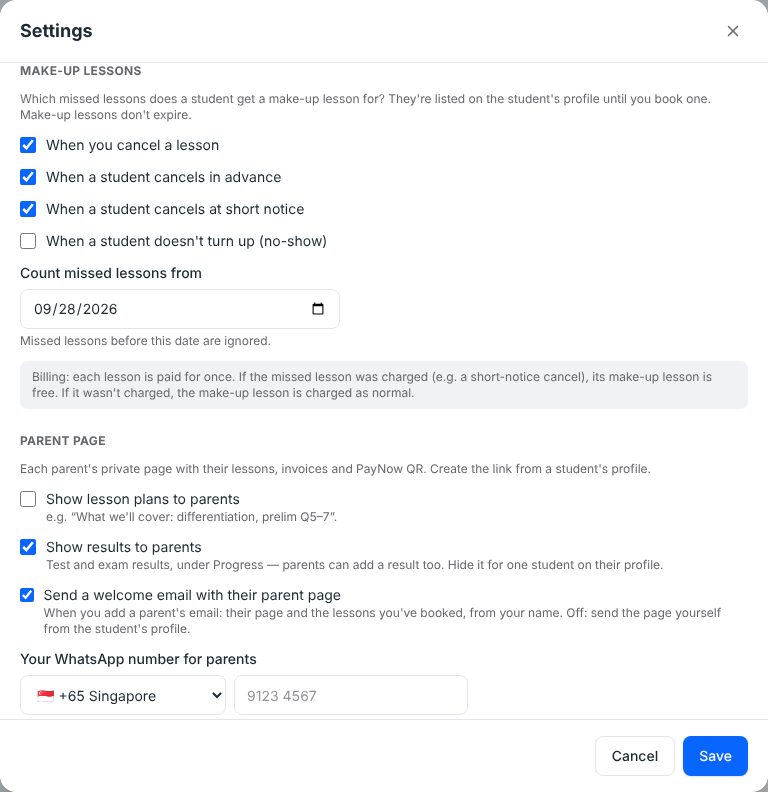
Then, each time a lesson is missed:
- Click the lesson on your Schedule and scroll to Attendance.
- For each student choose Attended, No-show, Cancelled or Short-notice cancel, add a note (“Sick — mum messaged at 2pm”) and click Save. If you cancel the lesson yourself, use Cancel lesson at the top.
- The make-up appears on the student's profile under Make-up lessons, and on your Overview under Make-up lessons to book.
- Click Book make-up next to the missed lesson, pick a date and time, and click Save. It's crossed off the list.
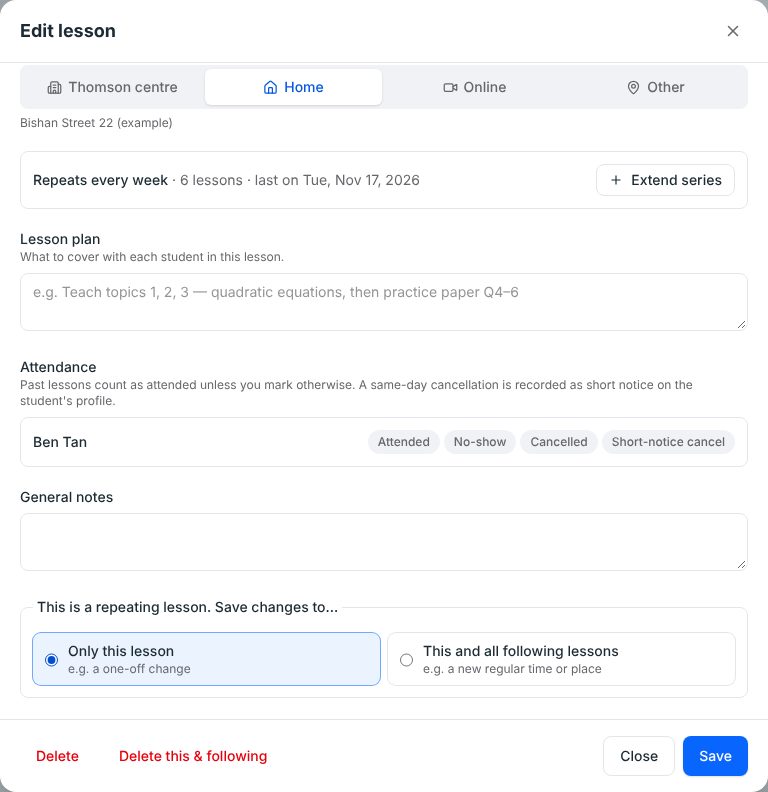

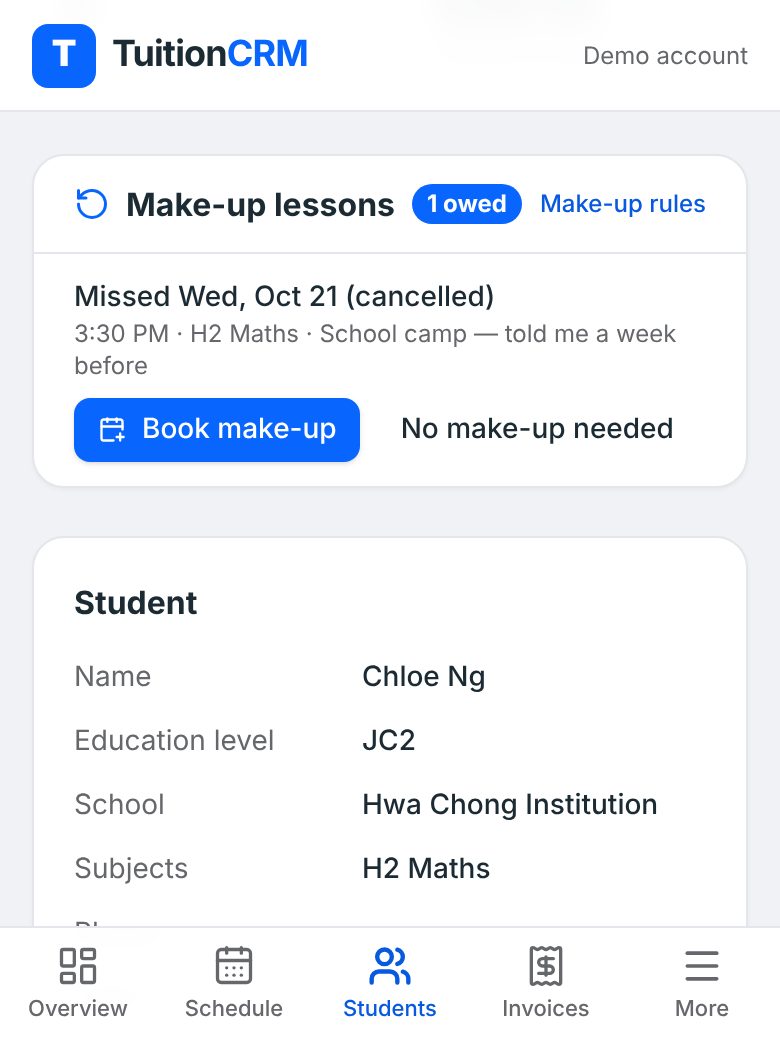
Billing follows the same rule automatically: if the missed lesson was charged, its make-up is free, and if it wasn't, the make-up is charged as normal. If a parent tells you they don't need one, click No make-up needed (you can undo it). For the full detail, see how make-up lessons work in the Help centre.
A 10-minute monthly make-up check
Do this the day before you send invoices, whatever tool you use:
- List every make-up still owed. Anything older than a month needs a date this week.
- Check each one against last month's invoice. Charged missed lesson = free make-up. Not charged = charge the make-up.
- Book the slots now. School holidays are the easiest time. MOE's 2027 school terms and holidays are out, so you can plan make-up weeks in March, June and September ahead.
- Look for patterns. A student who misses every second week needs a conversation, not more make-ups.
- Tell parents what's owed. One line in your invoice message (“Jayden has 1 make-up owed — shall we do Sat 10am?”) gets it booked faster.
If your income dips every exam season because of cancellations, plan your slots around the exam calendar. Our guide to planning your tuition year around Singapore exams shows the busy weeks, and the key dates page lists every national paper.
Talking to parents about make-ups owed
Most disagreements about make-ups are really about money: a parent feels they paid for a lesson they didn't get. Parents in Singapore are more careful about paying ahead than they used to be. CASE, the consumer association, reported that losses from prepaid packages more than quadrupled in 2024, mostly when businesses closed suddenly. Clear records showing what was paid for and what's still owed build trust.
- Be specific. “1 make-up owed for Wed 21 Oct” beats “you have some make-ups”.
- Offer two slots, not an open question. Parents reply faster to a choice.
- Let them see it. In TuitionCRM, make-ups owed show on each family's parent page, next to their lessons and invoices, so there's nothing to argue about.
A make-up list that's always up to date protects your income and your relationships with parents. Pick the tool that matches the number of students you teach, record the same six things every time, and spend ten minutes on the list before each billing day.
Common questions
Can a make-up lesson be done online?
Yes, if the parent agrees. An online make-up is often the easiest fix in exam season, when evenings are full. Say in your policy whether online make-ups are offered and whether they're the same length as a normal lesson.
What happens to make-ups owed when a student stops lessons?
Settle them before the last lesson. Either book the make-ups in the final weeks, or refund (or don't charge) the missed lessons that were paid for. Writing this into your lesson policy saves an awkward conversation later.
I was sick and cancelled. Do I owe a make-up?
Almost always, yes. When the tutor cancels, most tutors either give a make-up or don't charge the lesson. Record it the same way as a student cancellation, with “tutor cancelled” as the reason, so it's not forgotten.
How many make-ups should I allow per term?
Many tutors don't set a limit for cancellations with notice, but cap short-notice ones. For example: one free make-up per term for short-notice cancellations, after that the lesson is charged. Pick a rule you're happy to enforce.
Can a student join a group class as their make-up?
Yes, if there's a group at the same level with a free seat. It's a good way to fill make-ups without finding an extra slot. In TuitionCRM, tick the student on that lesson and choose which missed lesson it makes up for — see booking a make-up.